Family relationships
Connecting people who are already in the tree, and correcting a link that is wrong. Fifth of six guides to the tree workspace.
The Family section
Open anyone (the pencil on their card) and scroll down: Family lists everyone connected to them, grouped as Parents, Spouses and Children, with the actions for each.
Each numbered part of the picture below is repeated beside the step that explains it, so you can match the two at a glance.
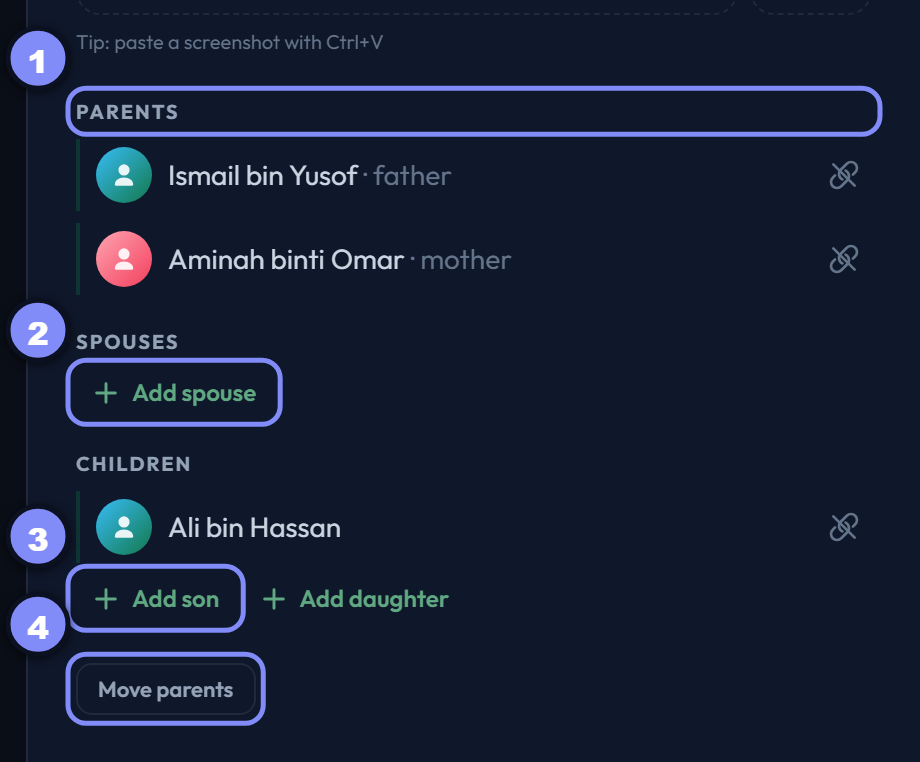
The Family section
Parent slots
Exactly two: father and mother. A filled slot shows the person; an empty one offers to add them. Two slots, always — which is why a parent is replaced rather than added to.
Add spouse
Adds a husband or wife. There is no limit, so co-spouses are simply added one after another, and each appears in the Spouses group.
Salasilah warns if you pick a direct ancestor or descendant — almost always a mis-click rather than an intention.
Add son or daughter
Two buttons rather than one, because the child's gender decides its card colour and its place among siblings — asking here saves a second edit.
Move parents
Replaces both parent links at once — for when someone was attached to the wrong couple entirely. Choose the mother first; the father list then offers her spouses, which is what keeps the couple consistent.
Advanced only. In Simple it is hidden, because moving someone between families is rarely what you want mid-edit.
Adding a relative
Search, or create as you type
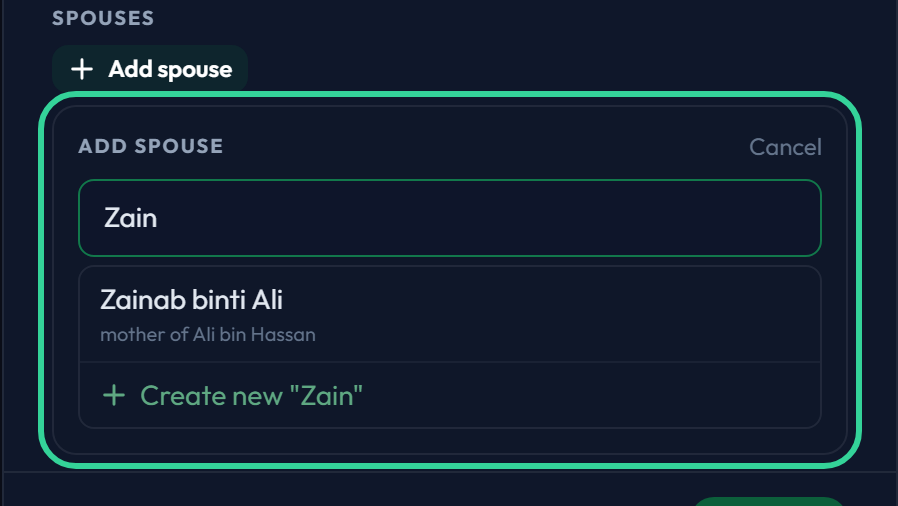
Every Add button opens the same small box. Start typing a name and it does two things at once: lists people already in the tree who match, and offers Create new "…" for the name you typed.
So there is no choice to make up front between "existing person" and "new person" — type the name and pick whichever line is right.
Correcting a link
Unlink a relative
Each row in Family carries a small unlink icon on the right. It removes that one relationship — this person is no longer their child, spouse or parent.
Use it when the connection is wrong: a child attached to the wrong father, a spouse who was never married to them.

Unlink is not delete
Unlinking removes the relationship only. Both people stay in the tree with everything else about them intact, and you can link them to someone else straight away.